How to Install Windows XP using with USB Flash Drive
Step.1:
Buy.an.USB.Flash.Drive.(at.least.
1GB). When you do this
tutorial, please make sure your
computer/laptop/PC.has.a.CD-ROM.(or.DVD).
Step.2:
Download this software pack
Bootable USB.exe
Download 636KB
This software pack contains 3 application:
-
BootSect.exe.(Boot.Sector.Manipulation.Tool)
-
PeToUSB.(http://GoCoding.Com)
-
usb_prep8 (Prepares Windows XP Setup LocalSource for Copy to USB-Drive)
Step.3:
Double.click.
Bootable USB (www.LearnHackz.Blogspot.com).exe
a.window.will.appear... and click
Install
Step.4:
Insert your USB Flash Drive.
When I made this tutorial, I was using
1GB Transcend USB
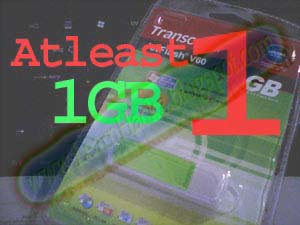
FlashDrive...
Locate folder
C:\bootable\PeToUSB\
double click PeToUSB.exe
a window will appear like this...

Destination Drive: select USB Removable
check on Enable Disk Format
check on Quick Format check on Enable LBA (FAT 16x)
Drive Label :
LearnHackz (or whatever you want)
then click
Start

Click Yes to continue....

"You are about to repartition and format a disk. Disk: ....
All existing volumes and data on that disk will be lost.
Are You Sure You Want To Continue?"
click Yes
 Click OK
, and you can close PeToUSB window.
 Step.5:
Open Command Prompt ...
Click Start > Run > type cmd >
click OK

On Command Prompt window, go to directory
C:\bootable\bootsect\
how to do this? first type this
cd\ and
press Enter

then type
cd bootable\bootsect and
press Enter
Don't close Command Prompt window, and go to step 6...
 Step.6:
on command prompt window, type
bootsect /nt52 L:
and
press Enter
 L:
L: is drive letter for my USB Flash Drive, it may be different with yours...
 Step.7:
now type this
cd.. and
press Enter

then type
cd usb_prep8 and
press Enter

type
usb_prep8 again... and
pres Enter
 Step.8:
Your command prompt window will look like this
Press any key to continue...

usb_prep8 welcome screen will appear
Prepares Windows XP LocalSource for Copy to USB-Drive:
0) Change Type of USB-Drive, currently [USB-stick]
1)Change XP Setup Source Path, currently []
2)Change Virtual TempDrive, currently [T:]
3)Change Target USB-Drive Letter, currently []
4)Make New Tempimage with XP LocalSource and Copy to USB-Drive
5)Use Existing Tempimage with XP LocalSource and Copy to USB-Drive
F)Change Log File - Simple OR Extended, currently [Simple]
Q)Quit
Enter your choice:_
Now, insert your original Windows XP CD, or Copy Complete
Windows XP CD On Your HardDisk .and back to Command Prompt window

type
1 then
press Enter...

"Browse For Folder" window will appear, select your CD/DVD
drive or root of complete XP files in your PC and click
OK

now type
3 and
press Enter...

"Please give Target USB-Drive Letter e.g type U" Enter Target
USB-Drive Letter:
so, type
L and
press Enter...

because my Flash drive letter is
L:
now type
4 and
press Enter to make new temporary image with XP
LocalSource and copy it to USB Flash Drive
please wait a few seconds..

"WARNING, ALL DATA ON NON-REMOVABLE DISK DRIVE T: WILL BE LOST!
Proceed with Format (Y/N)?"
type
Y and
press Enter

please wait....
when format virtual disk complete,
press any key to continue...

please wait... making of LocalSource folder is in progress...
when "Making of LocalSource folder $WIN_NT$.~LS Ready"
 Press any key to continue...

"Copy TempDrive Files to USB-Drive in about 15 minutes = Yes
OR STOP = End Program = No"
Click Yes,

and wait...

"Would you like USB-stick to be preferred Boot Drive U: bla..."
Click Yes

"Would you like to unmount the Virtual Drive ?"
Click Yes, wait a few seconds,
 and press any key....
 press any key
 again to close usb_prep8...
Now, your USB Flash Drive is ready...

After All done the properties of USB
 Step 9:
Now, insert your USB Flash Drive/Flash Disk/Thumb Drive to your Computer.
Go to BIOS and make
USB HDD (or USB ZIP in some other machine)
as primary or First boot device....
then boot form your USB Flash Drive....
and
select "
1. TXT Mode Setup Windows XP, Never unplug USB-Drive Until After Logon"
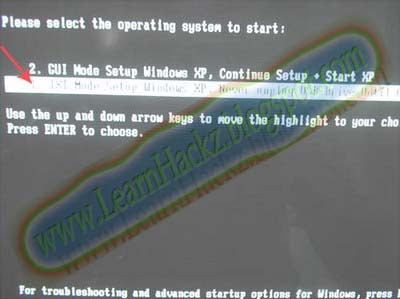
Continue Windows XP setup.... and Done!
Windows XP Installed....
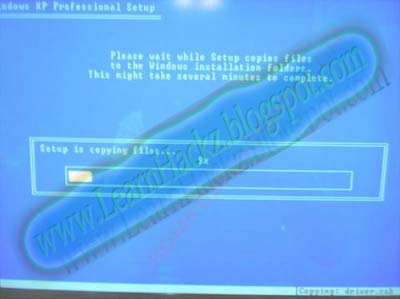
once text mode setup is complete, computer will restart....
this time select
"GUI Mode setup Windows XP, Continue Setup + Start XP"
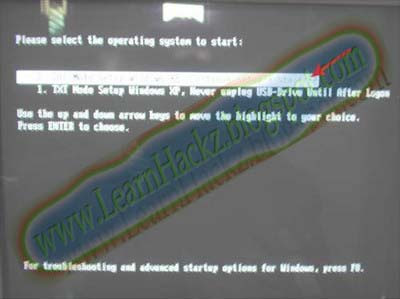
Remember, you can use this tutorial to install Windows XP on all other computers.


